 for a commercial license.
How to get cursor/caret position inside DW' textbox (DW18 - Integration Theme)
It is all about the JavaScript! A form designed inside the DriveWorks at the
end, at the time of use, is converted/rendered to/as HTML!
The main question is: How to find our DW' TextBox and DW' Label (<-an element
where to display the cursor position)? After finding the HTML element of
interrest, we need to implement/add EventListerners (keyup, click ..) to the
found HTML object to get results on a status change.
Once converted, all the HTML elements, are "under" DIV control! They do NOT have
unique IDs assigned but luckily there are DEVs unique names attribute! So, we
will use that to start our GetCursorPosition implementation:
Create a new JavaScript file and put all the below code into it: i.e.
DWCursorPosition.js
|
// global // let's find our DW HTML elements // add event listener to our HTML
DIV.TEXTBOX object onclick and onkeyup |
|
// get DW HTML elements |
|
// javascript |
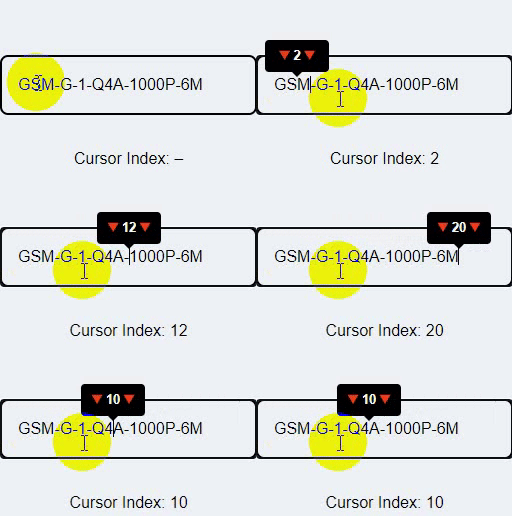
Now that we have cursor position we could go visual with a tooltip!
|
|
|
|
|
C# / C++ / VB / CAD / CAM / Esprit / Rhino3D / SQL / SOLIDWORKS /DriveWorks / SolidEdge programming & 3D Solid Design To contact me, I am available through the below listed e-mail address. If you are interested in any of the above, just drop me an email and I can make what needs to be done. e-mail:  |
