 for a commercial license.
SWMemReleaseSvc
|
Description: If you are running DriveWorks Autopilot (AP) through an RDP session on a remote Virtual Machine (VM) the following may be an interesting solution:
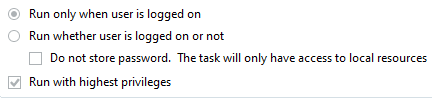
You might have experienced the following issue trying to keep an AP alive and running: An RDP user needs to be logged on for the AP to be running, but what will happen if the user logs off, a machine gets locked or restarted, and the computer gets updated? If the VM restarts, the user needs to login once and leave the RDP session open. Task Scheduler will not work since it is running as a service and AP has a UI (User Interface = interaction with desktop). From Vista on, the interaction with the Desktop has been disabled in the Windows OS. If the machine gets locked or restarted someone needs to logon once, and then disconnect RDP …etc.
If the AP crashes or is down for whatever reason (i.e. not running) this service will try to bring it up and start it again. The AP and SW will be running under a system account from that point on! If you do not like this solution, you can simply set Enable_isAutoPilot_EXE_Monitoring to NO or OFF and enable an email option to get notified then manually logon onto the server and start the AP again. The main two customizable functions of this service are : Release SolidWorks memory and email notificaiton if AP is down! How does the KeepAlive service Work? The service sets the "SetThreadExecutionState" and this keeps the session active! Note: this cannot be disabled.
There are a few options in this service that can be enabled or disabled except the KeepAlive option:
How does the KeepAlive service Work? The service sets the "SetThreadExecutionState" and this keeps the session active!
Enable_Email - YES/NO or OFF/ON - email will be sent to the addresses specified Enable_isAutoPilot_EXE_Monitoring - YES/NO or OFF/ON - it will monitor AP.exe and if down will send email (if Enable_Email set to YES/ON) or attempt to restart (if Enable_AutoPilot_Restart is set to YES/ON) Enable_SolidWorks_MemoryRelease - YES/NO or OFF/ON see SW_Memory_Release WriteToFile - YES/NO or OFF/ON - The log will be written where the service exe is placed +\\Logs\\DriveWorks_KeepAlive_ServiceLog_
Other configurable settings: DriveWorks_Solution_Name - if set to empty ("") the name will be: Server Service-> + server computer name TimerInterval - if set to 0, it will default to 1 minute EMAIL_ADDRESS - who to notify EMAIL_CC_ADDRESS - who to notify through CC as well SMTP_ADDRESS - your smtp mail server SMTP_PORT - port number Requires_SSL - SSL enable or disable SMTP_UserName - if required by your SMTP server SMTP_Password - if required by your SMTP server
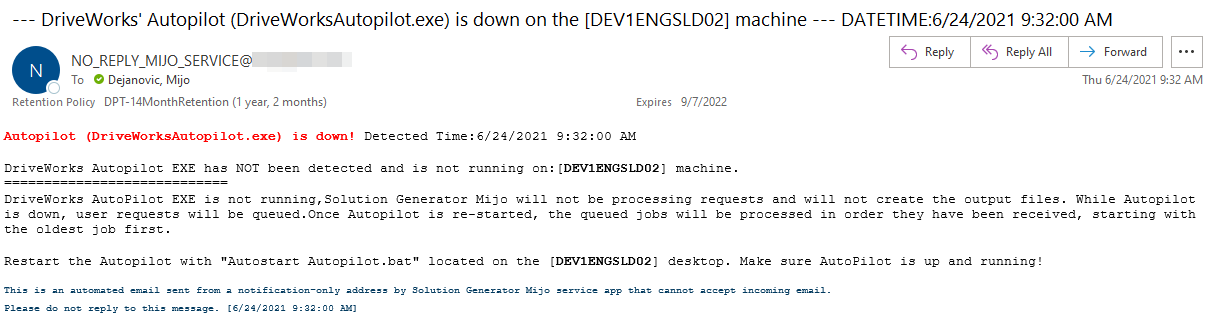
EMAIL_FROM - this will be sender address with the following message: With the following default message: "Autopilot (DriveWorksAutopilot.exe) is down! Detected Date & Time: XX.XX.XXXX:XX:XX:XX"
Enable_AutoPilot_Restart - if disabled (NO or OFF) the Autopilot will not restart, if enabled (YES) the service will attempt to restart the AP DW_AutopPilot_Path - where DW is installed i.e C:\Apps\Driveworks\18.0.0.693\DriveWorksAutopilot.exe DW_AutopPilot_CommandLine - FOR SHARED GROUPS ONLY The following needs to be set up: Server - Server/computer name Name - DriveWorks project name Username - username for the project listed under Name Password - password for the project listed under Name - leave it empty if there is no password set
SW_Memory_Release - Release SolidWorks Memory "if greater than this number in bytes, without restarting SolidWorks." This is happens on the fly even if SolidWorks is in the middle of processing.
Take a look at .config files for the default settings
How to install the SERVICE C:\Windows\Microsoft.NET\Framework\v4.0.30319\installutil "YourPath2ServiceEXE\SWMemReleaseSvc.exe" Service will start after installation and Status is set to Automatic
How to uninstall/remove the SERVICE C:\Windows\Microsoft.NET\Framework\v4.0.30319\installutil -u "YourPath2ServiceEXE\SWMemReleaseSvc.exe"
If service crashes for whatever reason there will be an event written, ID 8413, under Application and it can be examined with the Event Viewer
******** SERVICE NEEDS TO BE STOPPED then RE-STARTED for NEW VALUES TO BE RE-READ & REFRESHED **********
An email example :
|
| SWMemRelease_Service.zip |
|
|
|
C# / C++ / VB / CAD / CAM / Esprit / Rhino3D / SQL / SOLIDWORKS /DriveWorks / SolidEdge programming & 3D Solid Design To contact me, I am available through the below listed e-mail address. If you are interested in any of the above, just drop me an email and I can make what needs to be done. e-mail:  |